
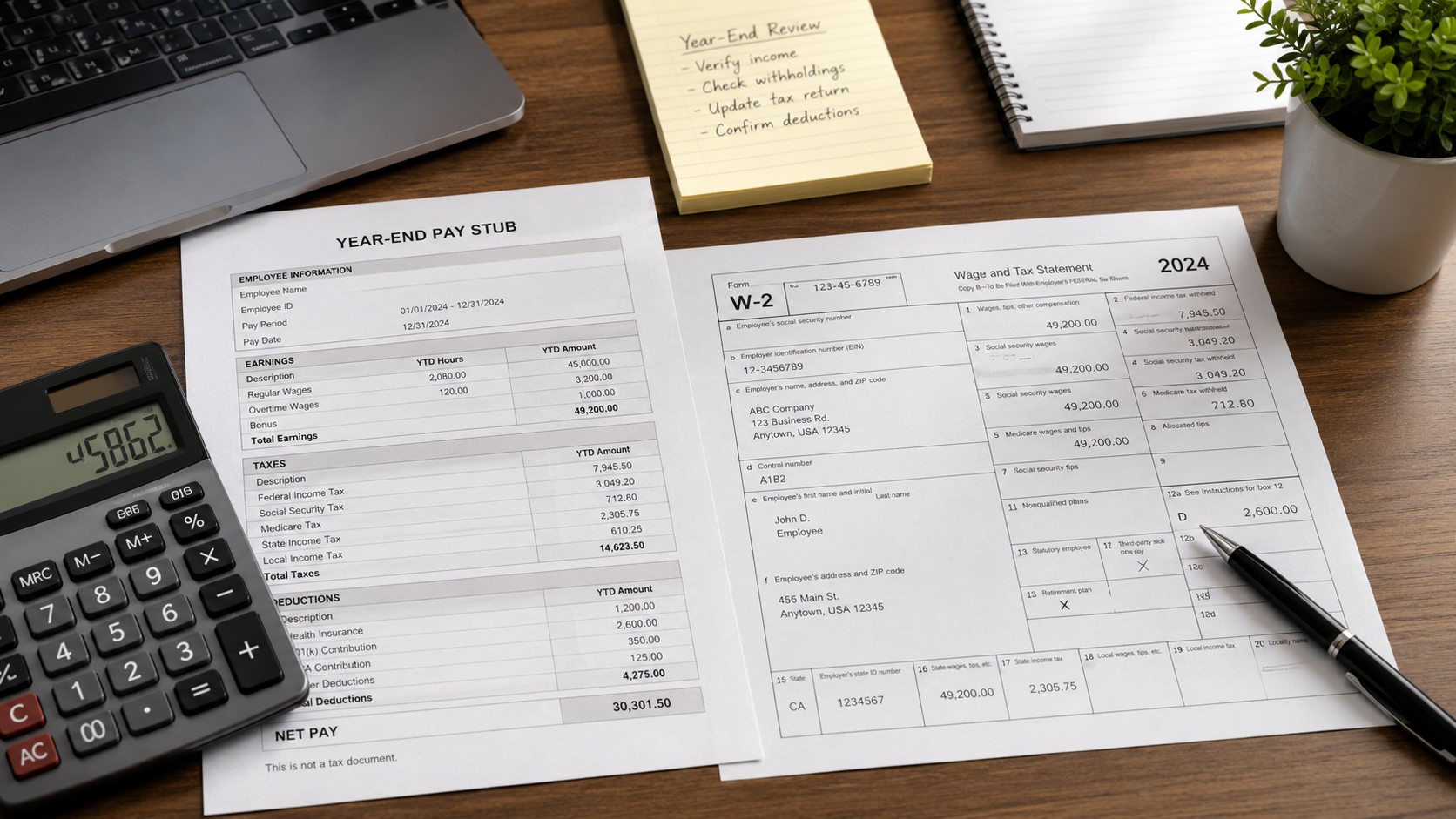
Calculate W-2 Wages From Pay Stub: Box 1 Formula (2026)
2026 payroll reconciliation guide
Quick answer: Start with the year-to-date (YTD) gross compensation on the last pay stub paid during the tax year. For an ordinary employee, subtract qualifying amounts excluded from federal income-tax wages, add taxable compensation not already included in gross, and remove nontaxable payments only if they were included in that gross amount. The result is an estimate of W-2 Box 1. Traditional 401(k) deferrals generally reduce Box 1; Roth 401(k) contributions do not. Social Security and Medicare wages follow different rules.
A final pay stub may not display year-end imputed income or payroll corrections. Check the employer's YTD federal taxable wages when available, and use the employer-issued W-2 for filing unless the IRS's substitute-form process applies. This guide is for wages paid in 2026, generally reported on a W-2 issued in early 2027. A 2025 W-2 used during the 2026 filing season belongs to a different tax year.
What to Check on Your Final Pay Stub
Use the last statement with a pay date in 2026, not merely the last work period ending in December. Work performed in December but normally paid in January is generally reported in the later pay year. If it is only September or your employer has not processed its last payroll, you can estimate YTD wages, not a final annual W-2.
- Starting earnings: YTD cash earnings and amounts the employer includes in gross; determine whether reported tips and imputed benefits are already there.
- Deduction classifications: distinguish traditional retirement deferrals, Roth/after-tax deductions, and qualifying benefits excluded from both income-tax and FICA wages.
- Excluded payments: confirm whether nontaxable reimbursements entered your gross calculation at all.
- Employer wage ledgers: when available, check YTD federal taxable wages, Social Security wages, Medicare wages, and reported Social Security tips separately.
- Actual withholding: the FIT, Social Security and Medicare YTD tax amounts can help cross-check Boxes 2, 4 and 6, but they are not deductions when calculating Box 1.
Find the right columns with our labeled pay-stub example; use the YTD guide to check cumulative earnings and deductions. If your starting figure says “net pay,” see gross pay versus net pay before using the calculator.
How to Calculate W-2 Box 1 From Your Pay Stub
Traditional employee retirement-plan deferrals usually reduce Box 1 but remain in Social Security and Medicare wages; use our traditional versus Roth 401(k) pay-stub guide to identify which contribution is which. Qualifying section 125 benefits commonly reduce all three wage bases; the pretax versus post-tax deduction guide explains which payroll deductions are actually excluded. Roth deferrals are after-tax: do not remove them from Box 1 merely because the employer labels them “retirement.” Employer-funded HSA contributions and the informational health-coverage cost in Box 12 also must not automatically be subtracted from the employee's gross. To separate employee payroll contributions from employer funding, check HSA EE versus HSA ER. The classification, not the label alone, controls the calculation.
2026 W-2 Wage Estimator and Reconciliation Tool
Enter figures for one employer and one calendar year. All dollar inputs represent year-to-date totals. The tool works in your browser and does not send entered figures to ePaystubs. This is a simplified educational estimator, not employer payroll software or a substitute for an official W-2.
Tax year: 2026 only. Social Security wage base: $184,500. Ordinary-employee wage estimates may differ because of special payroll reporting rules, corrections, allocation of tips, or missing year-end adjustments.
Worked Example: Why Box 1, Box 3 and Box 5 Differ
Imagine one ordinary employee, no reported tips, no year-end corrections and no special FICA coverage. Their payroll gross already includes both traditional and Roth retirement contributions but omits a taxable group-term life benefit of $200. If your statement lists GTL or IMP, check the imputed-income guide before adding that benefit a second time.
| Fictional YTD payroll item | Amount | How to treat it |
|---|---|---|
| Gross compensation | $60,000 | Starting amount |
| Traditional 401(k) | $6,000 | Deduct from Box 1 only |
| Qualifying section 125 health premium | $3,000 | Deduct from Boxes 1, 3 and 5 |
| Roth 401(k) | $1,000 | Informational; do not subtract again |
| Taxable group-term life benefit missing from gross | $200 | Add to applicable wages |
| Estimated Box 1 | $51,200 | $60,000 − $6,000 − $3,000 + $200 |
| Estimated Box 3 | $57,200 | $60,000 − $3,000 + $200 |
| Estimated Box 5 | $57,200 | Same covered FICA wages; no Medicare cap |
Reconciliation example: If you initially subtracted the Roth contribution, you would estimate Box 1 as $50,200 instead of $51,200. The $1,000 gap points to a possible deduction classification error; the employee must confirm the actual payroll record before treating that as the cause of a reported difference.
How to Calculate Boxes 3, 4, 5, 6 and 7
Box 3: Social Security wages
Start from compensation subject to ordinary FICA, do not subtract qualifying traditional 401(k) deferrals, subtract qualifying FICA-exempt benefits, and separately account for reported Social Security tips. For 2026, the combined Social Security wage-and-tip base in Boxes 3 and 7 cannot exceed $184,500 for this employer. Box 3 excludes tips reported separately in Box 7. Where reported tips and wages together exceed the cap, annual gross alone may not establish the employer's precise Box 3/7 allocation; the calculator identifies that limitation rather than guessing.
Box 5: Medicare wages and tips
Box 5 ordinarily includes covered wages and employer-reported tips, with no Social Security-style wage cap. An employee may therefore have Box 5 above Box 3 because of the cap and/or the separate reporting of tips. The formula must still respect any applicable special coverage or fringe-benefit treatment.
Boxes 2, 4 and 6: Taxes actually withheld
For Box 2, use the YTD federal income tax withheld (often labeled FIT or FWT); our federal-withholding guide shows which pay-stub line to compare. Tax brackets and personal W-4 elections prevent recovering Box 2 reliably from Box 1 alone. For Box 4, use the employer's actual Social Security tax withheld, including amounts collected on tips; 6.2% of the taxable base can be a rough ordinary-employee cross-check but may differ for tipped workers or adjustments. For Box 6, use actual Medicare tax withheld, including 0.9% Additional Medicare Tax when an employer's Medicare wages paid to that employee exceed $200,000 during 2026. Ordinary Medicare generally uses 1.45%, without an annual wage cap. Do not divide total Box 6 by 1.45% to reconstruct Box 5 when Additional Medicare Tax is present. If you see MED EE, MEDI or ADDL MED, use the Medicare pay-stub code guide to identify the employee withholding line.
Illustrative tipped-employee calculation
Assume an ordinary employee has $40,000 of wages and $10,000 of tips reported to the employer, with neither deductions nor other adjustments, and the employer's starting gross already includes those reported tips. Estimated Box 1 is $50,000, Box 3 is $40,000, Box 7 is $10,000, and Box 5 is $50,000. The same reported tips must not be added to gross a second time. Allocated tips shown in Box 8 are different: they are not automatically included in Boxes 1, 3, 5 or 7. If the combined Social Security wage base is above the 2026 cap, obtain the employer's Box 3 and Box 7 breakdown instead of applying this simple example mechanically.
Which 2026 W-2 Box 12 Codes Affect the Calculation?
Do not treat every Box 12 amount as another paycheck deduction. These codes identify what the employer reported; whether a contribution is already reflected in gross determines whether subtracting it would count the same exclusion twice. For codes not needed in this calculation, see the complete W-2 boxes and Box 12 reference.
| Code | What it generally reports | What to do when reconciling wages |
|---|---|---|
| D, E, G | Specified traditional retirement deferrals | Usually excluded from Box 1 but included in FICA wage bases. Subtract only employee amounts still included in starting gross. |
| AA, BB, EE | Designated Roth contributions to specified plans | Do not subtract as pretax retirement deferrals. |
| W | HSA contributions by the employer, including employee cafeteria-plan amounts | Separate employer funds from employee salary reductions. Do not deduct the whole code W amount from employee gross by default. |
| C | Taxable cost of group-term life coverage over $50,000 | Check whether the taxable benefit has already entered wage totals before adding it. |
| DD | Cost of employer-sponsored health coverage | Informational amount; do not subtract Code DD as a new Box 1 deduction. |
| TP (2026) | Total cash tips reported to employer | Do not automatically subtract tips from taxable wages. Confirm whether tips are already in gross. |
| TT (2026) | Qualified overtime compensation | Do not subtract Code TT from W-2 wages merely because a separate income-tax return deduction may apply. |
Important 2026 distinction: A possible tax-return deduction for qualifying tips or overtime does not, by itself, exclude the underlying reported compensation from W-2 Box 1. Code TP and Code TT are reporting codes; they are not instructions to deduct their dollar amounts from the employer's reported wages. Eligibility for any separate deduction depends on the applicable tax-return rules and circumstances. See the IRS 2026 W-2 reporting instructions.
Why Your Final Pay Stub and W-2 Do Not Match
A different number does not by itself mean either document is wrong. Compare the same employer, same calendar year and same wage box. Work through these checks in order:
- Pay date: exclude a December work period paid in January of the next calendar year.
- Starting figure: confirm that the pay stub says gross earnings, not already-adjusted federal taxable wages or net pay.
- Traditional versus Roth: confirm retirement contribution types and whether employee amounts are already included in the starting figure.
- Benefits and tips: inspect section 125 premiums, HSA employer contributions, Box 12 codes, reported tips, imputed life-insurance income and late adjustments.
- Employer wage bases: compare federal taxable wages, Social Security wages, Medicare wages and Social Security tips separately.
- Unresolved difference: request a year-end wage reconciliation or correction from payroll; do not invent a balancing number to force a match.
What If Your W-2 Is Missing or Incorrect?
A 2026 W-2 is generally furnished after the year ends, in the 2027 filing season. If you have no W-2 after the normal delivery window, first contact the employer. If it remains missing or is wrong, follow the IRS missing or incorrect W-2 process; Form 4852 is a substitute procedure in specified situations, not a reason to fabricate a W-2. See also our missing W-2 guide.
Organize Figures You Have Verified
After reconciling figures against employer records, the ePaystubs W-2 form generator can help format user-entered information. It does not issue an employer-filed W-2, establish actual earnings, or replace the official wage statement.
Frequently Asked Questions
Can I get Box 1 from my final paycheck's net pay?
No. Net pay reflects actual withholding and deductions that do not necessarily affect taxable wages. Begin with documented YTD gross or employer-reported federal taxable wages.
Why can Box 3 be below Box 5?
Box 3 excludes separately reported Social Security tips and is subject to the Social Security taxable maximum. Box 5 generally includes reported tips and is not subject to that annual cap.
Should I subtract Roth 401(k) or the full Code W amount?
No. Roth contributions are generally included in Box 1, and Code W may include employer HSA contributions that did not come from employee gross. Confirm each amount's source and tax treatment.
Do Code TP or TT make tips and overtime nontaxable on my W-2?
No. They identify reported cash tips or qualified overtime compensation for 2026 reporting. A separate tax-return deduction, if applicable, does not automatically lower the wages the employer reports in Box 1.
Can I submit an estimated W-2 instead of my employer's W-2?
Use the official W-2 when available. If it is missing or incorrect, follow the IRS's employer-contact and substitute-form instructions rather than submitting a self-generated employer wage statement.