
How to Read a Pay Stub: Labeled Example of Earnings, Taxes and Deductions
Home › Blog › How to Read a Pay Stub
Substantially reviewed: September 1, 2026
Source review: Federal payroll-tax figures checked against IRS Publication 15; overtime and employer recordkeeping statements checked against U.S. Department of Labor guidance.
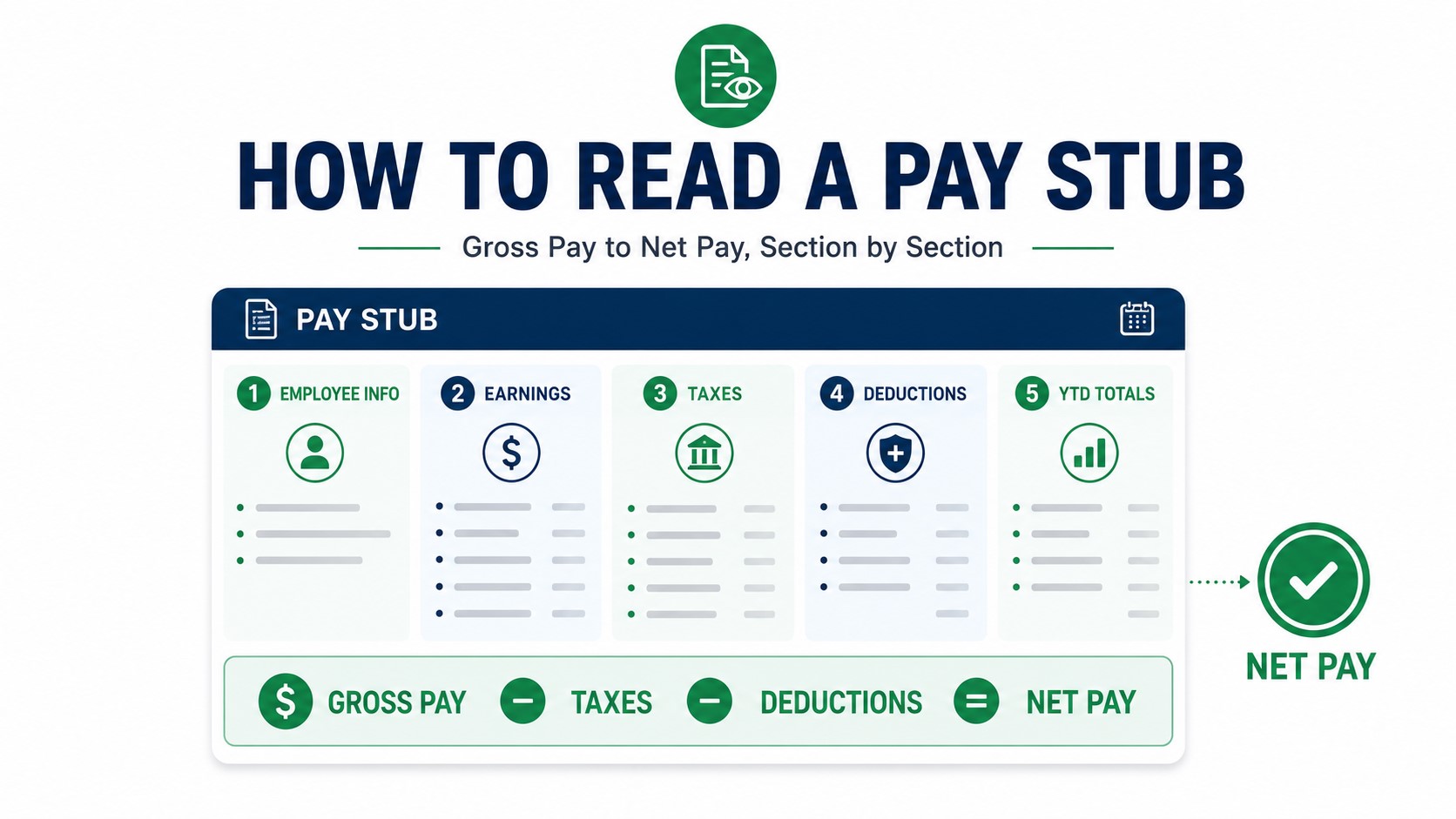
To read a pay stub, follow five steps: confirm the pay period, verify your hours and gross earnings, identify the taxable wage amount behind each tax, separate employee deductions from employer-paid items, and then reconcile net pay and year-to-date totals.
The labeled example and private audit tools below let you follow those steps using the same logic on your own statement.
Labeled Pay Stub Example: Read It From Top to Bottom
This fictional statement is designed to show more than just gross and net pay. It includes separate taxable wage bases, employee deductions, an employer contribution and a reimbursement so you can see which lines actually change take-home pay.
| Earnings | Rate | Hours | Current | YTD |
|---|---|---|---|---|
| Regular | $35.00 | 80.00 | $2,800.00 | $33,600.00 |
| Bonus | — | — | $200.00 | $2,400.00 |
| 5Gross Pay | — | — | $3,000.00 | $36,000.00 |
| Wage Base | Current | YTD | Why It Differs |
|---|---|---|---|
| Federal taxable wages | $2,670.00 | $32,040.00 | Gross reduced by the example's qualifying health deduction and traditional 401(k) deferral for federal income-tax purposes. |
| Social Security wages | $2,850.00 | $34,200.00 | The example's qualifying health deduction reduces this wage base; traditional 401(k) deferral does not. |
| Medicare wages | $2,850.00 | $34,200.00 | Same wage base as Social Security in this fictional example. |
| Tax | Current | YTD |
|---|---|---|
| Federal Income Tax | $260.00 | $3,120.00 |
| Social Security / OASDI | $176.70 | $2,120.40 |
| Medicare | $41.33 | $495.96 |
| Illustrative State Withholding | $85.00 | $1,020.00 |
| Deduction | Current | YTD |
|---|---|---|
| Health Plan — qualifying pre-tax example | $150.00 | $1,800.00 |
| Traditional 401(k) | $180.00 | $2,160.00 |
| Roth 401(k) | $60.00 | $720.00 |
| Employer 401(k) match | $90.00 | $1,080.00 | Does not reduce employee net pay |
| Non-taxable reimbursement — fictional example | $25.00 | $300.00 | Added to payment in this example |
The $90 employer 401(k) match is intentionally excluded from that subtraction because it does not reduce employee take-home pay.
Pay Stub Audit Checker: Does Your Current Pay Add Up?
Enter the current-period amounts from your pay stub. This tool checks the arithmetic only. It does not determine whether a tax, deduction, wage base or withholding amount is legally correct.
Step 1: Verify Hours, Rates and Gross Earnings
Start with the period being paid. Make sure the pay period and pay date are the ones you expect. Then review every current-period earnings line.
Common earnings may include:
- regular wages;
- overtime;
- paid time off;
- holiday pay;
- shift differential;
- bonus;
- commission;
- retroactive pay.
For hourly employees, compare the hours and rates with the employer's timekeeping record. For covered nonexempt employees, federal FLSA overtime generally requires at least 1.5 times the employee's regular rate after 40 hours worked in a workweek; state law can provide additional protections.
If the hours on the statement do not match your records, see Pay Stub Hours Don't Match Your Timecard .
Step 2: Do Not Skip the Taxable Wage Bases
Before deciding that a tax looks wrong, identify the wage amount used for that tax. Different deductions can affect different wage bases differently.
| Pay-Stubs Figure | What It Represents | Why It May Differ |
|---|---|---|
| Gross pay | Total earnings before employee taxes and deductions | Starting earnings figure |
| Federal taxable wages | Wages used for federal income-tax withholding calculations | Can be reduced by qualifying pre-tax deductions |
| Social Security wages | Covered wages subject to Social Security tax | Different exclusions can apply; traditional 401(k) elective deferrals generally remain subject to Social Security tax |
| Medicare wages | Covered wages subject to Medicare tax | May resemble Social Security wages, but Medicare has no Social Security-style annual wage-base cap |
| State/local taxable wages | Wage base used under applicable state/local rules | Rules vary by jurisdiction |
Why “pre-tax” does not mean the same thing for every tax
| Illustrative Item | Federal Income-Tax Wages | Social Security Wages | Medicare Wages |
|---|---|---|---|
| Traditional 401(k) employee deferral | Generally reduces | Generally does not reduce | Generally does not reduce |
| Roth 401(k) | Generally does not reduce | Generally does not reduce | Generally does not reduce |
| Qualifying Section 125 benefit | Can reduce | Can reduce | Can reduce |
| Taxable fringe / imputed income | Can increase | Can increase when subject to FICA | Can increase when subject to FICA |
For the deeper payroll math, see Taxable Wages on a Pay Stub .
Step 3: Read the Employee Tax Lines
The most common federal payroll-tax lines are federal income-tax withholding, Social Security/OASDI and Medicare. State or local withholding may also appear depending on where you work and the applicable rules.
Federal income-tax withholding
Federal withholding is not simply your tax bracket multiplied by gross pay. It depends on factors such as taxable wages, payroll frequency, Form W-4 information and applicable IRS withholding procedures.
See: FIT / FWT on a Pay Stub .
Social Security / OASDI
For 2026, employee Social Security tax is generally 6.2% of covered Social Security-taxable wages up to the annual Social Security wage base of $184,500.
See: OASDI on a Pay Stub .
Medicare
The standard employee Medicare rate is generally 1.45% of covered Medicare wages and has no annual wage-base cap. Employers also pay their normal 1.45% Medicare share, but they do not match the employee's 0.9% Additional Medicare Tax.
See: MED / Medicare on a Pay Stub .
Step 4: Separate Employee Deductions From Employer-Paid Items
Not every line shown in a benefit or deduction section actually subtracts from employee take-home pay.
| Line Type | Usually Reduces Current Net Pay? | Why |
|---|---|---|
| Employee federal/state/local tax | Yes | Employee withholding |
| Employee health deduction | Yes | Employee-funded benefit deduction |
| Employee traditional/Roth 401(k) | Yes | Employee retirement contribution |
| Employer 401(k) match | No | Employer-funded contribution |
| Employer Social Security / Medicare | No | Employer payroll-tax expense |
| Employer-paid benefit | Usually no | May be displayed for information |
| Imputed income | Not a simple deduction | Can increase taxable wages without increasing cash pay by the same amount |
| Reimbursement | May increase payment | Can appear as an addition rather than an earning subject to the same tax treatment |
| YTD figure | No | Cumulative information only |
For more code-specific detail: Pay Stub Deduction Codes .
Step 5: Reconcile Net Pay and the Payment Distribution
Net pay is what remains after employee taxes and deductions, adjusted for any applicable additions or reimbursements.
Do not assume one bank deposit always has to equal the entire net-pay amount. Some employees split direct deposit across multiple accounts.
The stronger check is:
In the fictional example:
- Checking deposit: $1,800.00
- Savings deposit: $271.97
- Total distributed: $2,071.97
- Displayed net pay: $2,071.97
Check Current vs YTD Totals
Current means this pay period. YTD means the cumulative total shown through the current paycheck.
In an ordinary period with no correction:
But corrections, reversals, refunds and payroll reclassifications can legitimately make the pattern more complicated.
For deeper YTD guidance, see Current vs YTD on a Pay Stub .
If Something Looks Wrong, Start Here
| What Looks Wrong | First Place to Check | Possible Explanation |
|---|---|---|
| Gross pay is too low | Pay period → hours → rate → earnings codes | Missing hours, wrong rate, missing shift/bonus/OT or partial period |
| Gross is right but net is too low | Employee taxes and deductions | Benefit change, withholding change, garnishment, correction or new deduction |
| Social Security looks wrong | Social Security taxable wages | Wrong wage base assumption, annual wage cap or payroll correction |
| Federal withholding changed | Federal taxable wages + W-4/pay change | Changed wages, bonus, W-4 information or benefit treatment |
| 401(k) or benefit changed | Current election vs previous stub | Election change, percentage contribution, eligibility or correction |
| YTD does not equal previous YTD + current | Adjustment/reversal codes | Correction, refund, reclassification or prior-period adjustment |
| One bank deposit does not equal net | Payment distribution | Split direct deposit or separate payment allocation |
| ER contribution appears beside deductions | Employee/employer designation | Employer-paid informational amount may not reduce net |
| Taxable wages are higher than cash earnings | Imputed/taxable fringe income | A non-cash taxable benefit may have increased taxable wages |
What should you send payroll if you find a discrepancy?
“My pay stub dated [pay date] shows [field] of $[amount]. Based on [hours, rate, prior YTD, benefit election or other record], I expected approximately $[amount]. Please confirm how this line was calculated and whether a correction is needed.”
Keep the original pay stub and supporting records. Do not edit the statement yourself to make the figures appear consistent.
Pay Stub vs Paycheck vs W-2
| Document | What It Does | When You Use It |
|---|---|---|
| Paycheck / payment | Delivers the employee's net payment | Each pay period |
| Pay stub | Explains earnings, wage bases, taxes, deductions, net pay and YTD | Payroll verification and income documentation |
| Form W-2 | Reports annual wage and withholding information for tax reporting | Year-end tax filing and wage reconciliation |
For the deeper comparisons: Pay Stub vs Paycheck and Pay Stub vs W-2.
Are Employers Required to Provide Pay Stubs?
Federal FLSA rules require covered employers to maintain specified payroll records, but federal law does not create one identical nationwide employee pay-stub format. State pay-statement requirements vary, so use the applicable state rule for the employee's situation.
The U.S. Department of Labor states that covered employers generally must retain payroll records for at least three years, while certain records used to calculate wages must generally be retained for two years. That employer recordkeeping rule is separate from an employee's decision about how long to keep personal copies of pay stubs.
See: U.S. DOL Fact Sheet #21 and ePaystubs State Pay Stub Guides .
Frequently Asked Questions
Confirm the pay period first, then verify current earnings and gross pay. Next identify the taxable wage amount behind each tax, separate employee deductions from employer-paid items, and reconcile net pay with the total payment distribution. Finally, compare current amounts with YTD totals.
There is no single number to check in isolation. Gross pay confirms what you earned, taxable wage bases explain the taxes, and net pay shows what remains. A correct audit connects all three.
Qualifying pre-tax deductions can reduce one or more taxable wage bases. Different deductions can affect federal income-tax, Social Security, Medicare and state wage bases differently, so do not assume every taxable wage line must equal gross pay.
A common reason is a traditional 401(k) employee deferral. It generally reduces federal income-tax wages but remains subject to Social Security and Medicare taxes.
EE commonly identifies an employee amount and ER commonly identifies an employer amount, but payroll abbreviations are not universally standardized. Confirm the employer's payroll legend when available.
Employer-funded items such as an employer 401(k) match normally do not reduce employee take-home pay. Some statements show employer contributions for information alongside employee deductions.
The total payment distribution should reconcile to net pay. If you use split direct deposit, one individual bank deposit may be lower than the net-pay line because the remaining amount was sent to another account.
YTD means year-to-date. It is the cumulative amount shown through the current paycheck. In a normal period, previous YTD plus current amount should approximately equal the new YTD, although corrections and reversals can change that pattern.
Look for employer-paid items that should not be subtracted, reimbursements or additions that increase payment, an omitted employee deduction, payroll adjustments, or split payment lines. Use the audit checker above to test the basic current-period arithmetic.
Generally no. Traditional employee 401(k) elective deferrals usually reduce federal income-tax wages but remain subject to Social Security and Medicare taxes.
The fictional pay stub is mathematically reconciled before publication. The audit calculator checks current-period arithmetic only and does not determine legal tax liability or withholding accuracy.
2026 Social Security and Medicare figures are checked against IRS Publication 15. Federal overtime wording and payroll-record retention statements are checked against U.S. Department of Labor guidance.
Official Sources
Explore Each Part of Your Pay Stub
About Marcus Hale
Marcus Hale is ePaystubs' Pay Stub & Payroll Content Specialist. His work focuses on explaining pay statements, gross-to-net payroll math, deduction codes, earnings, taxable wages and year-to-date totals in plain language.
Need to Prepare a Legitimate Current Pay Stub?
Employers and authorized payroll users can use ePaystubs to organize genuine current payroll information into a clear pay-stub format. A generated record should not be used to replace or alter an employer-issued historical statement.
generate pay stubs