
What Does YTD Mean on a Pay Stub? Earnings, Deductions and Calculation Guide
Home › Blog › What Does YTD Mean on a Pay Stub?
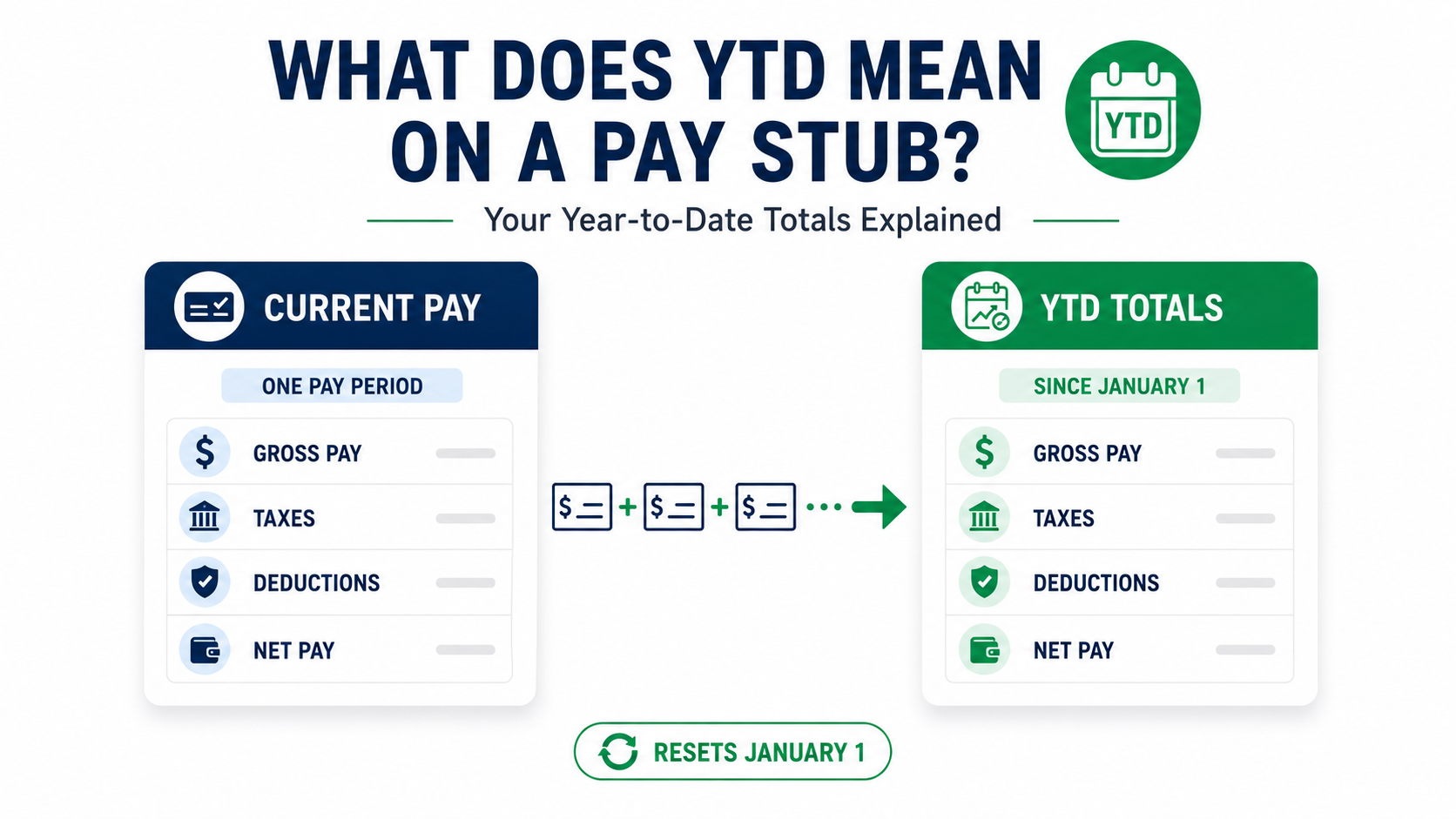
YTD stands for year-to-date. On a pay stub, it is the running total for the specific line beside it from the start of the calendar year through the current pay date. For example, Gross YTD is accumulated gross earnings, Tax YTD is accumulated tax withholding, Net YTD is accumulated take-home pay, and Hours YTD is the running total of the hour category shown.
YTD tells you the time period. The word beside YTD tells you what is being totaled. There is no single universal “YTD amount” on a paycheck. A pay stub can contain several different YTD totals at the same time.
Decode the YTD Number on Your Pay Stub
Choose the YTD label you see on your paycheck. This tool explains what that specific number generally represents.
Current Pay vs. YTD on a Pay Stub
The Current and YTD columns often show the same payroll lines over two different time periods.
| Pay Stub Line | Current | YTD |
|---|---|---|
| Gross pay | Gross earnings on this paycheck | Gross earnings accumulated during the year |
| Federal income tax | Federal tax withheld from this paycheck | Federal tax withheld so far this year |
| 401(k) | Employee contribution from this check | Employee contributions recorded so far this year |
| Net pay | Take-home amount for this paycheck | Take-home pay accumulated during the year |
| Regular hours | Regular hours on this pay period | Regular hours accumulated so far |
Current and YTD can be equal on your first paycheck of the year, your first paycheck from a new employer, or the first paycheck containing a new earning or deduction.
For a more detailed side-by-side explanation, see Current vs YTD on a Pay Stub .
Example: How Current and YTD Look on a Pay Stub
| Payroll Line | Current | YTD |
|---|---|---|
| Regular Earnings | $2,400.00 | $19,200.00 |
| Overtime | $225.00 | $1,120.00 |
| Gross Pay | $2,625.00 | $20,320.00 |
| Federal Income Tax | $280.00 | $2,350.00 |
| Social Security | $162.75 | $1,259.84 |
| Medicare | $38.06 | $294.64 |
| Health Insurance | $75.00 | $600.00 |
| Net Pay | $2,069.19 | $15,815.52 |
| Regular Hours | 80 | 640 |
| Overtime Hours | 5 | 24 |
In the example, $2,625 is gross pay for this paycheck, while $20,320 is gross pay accumulated during the year. The same Current-versus-YTD relationship applies to the tax, deduction, net-pay, and hour lines.
What Is YTD Gross Pay?
YTD gross pay is the total gross earnings your employer's payroll system has recorded for you during the current calendar year through the latest pay date.
Depending on your compensation, YTD gross can include:
- Regular wages or salary
- Overtime
- Bonuses
- Commissions
- Tips processed through payroll
- Retroactive pay
- Other gross earnings recorded by payroll
If your current gross pay is $2,400 and your YTD gross is $19,200, the $2,400 applies to the current paycheck. The $19,200 represents gross earnings accumulated across the applicable payrolls so far that year.
Gross earnings and federal taxable wages can differ because different types of compensation, pre-tax benefits, retirement contributions, and other payroll items can receive different tax treatment.
Is YTD the Same as Gross Income?
No. YTD is a time-period label, not a type of income.
For example:
- Gross YTD means gross earnings accumulated this year.
- Net YTD means take-home pay accumulated this year.
- Tax YTD means tax withheld this year.
- Hours YTD means hours accumulated for that category.
So if someone asks, “Is YTD gross income?” the accurate answer is: only when the payroll line specifically says Gross YTD or YTD Gross.
What Does YTD Taxable Wages Mean?
YTD taxable wages is the running amount of wages subject to a particular tax. It should not automatically be treated as identical to YTD gross pay.
| YTD Figure | What It Measures |
|---|---|
| Gross YTD | Total gross earnings recorded by payroll |
| Federal taxable wages YTD | Wages subject to federal income-tax treatment after applicable adjustments |
| Social Security wages YTD | Wages subject to Social Security tax |
| Medicare wages YTD | Wages subject to Medicare tax |
| Net Pay YTD | Accumulated take-home pay after payroll deductions and withholding |
These figures can differ on the same pay stub. For example, a benefit deduction may affect federal taxable wages without changing the gross earnings figure in the same way.
What Is YTD Net Pay?
YTD net pay is the running total of take-home pay recorded by payroll during the year.
It is different from:
- YTD gross earnings;
- taxable wages;
- annual salary;
- total tax withholding.
Net pay reflects what remains after the applicable payroll taxes and employee deductions have been accounted for on each paycheck.
Split direct deposits, payroll corrections, manual checks, reimbursements, or other payment arrangements can affect how payroll net pay compares with the activity in one bank account.
What Does YTD Hours Mean?
YTD hours is the running total of the hours recorded under the specific payroll category shown.
A pay stub can separately display:
- Regular hours YTD
- Overtime hours YTD
- Vacation hours
- Sick hours
- PTO hours
- Holiday hours
- Other paid-hour categories
Do not assume a single YTD-hours number always means only hours physically worked. Read the category label beside the total.
For example, Regular Hrs YTD and OT Hrs YTD are two different running totals.
What Does YTD Tax Mean on a Pay Stub?
A YTD tax figure shows how much of that specific tax payroll has withheld so far during the year.
Typical YTD tax lines can include:
- Federal income tax YTD
- State income tax YTD
- Social Security tax YTD
- Medicare tax YTD
- Local tax YTD where applicable
- Other state-specific payroll taxes
Read each line separately. A combined “Taxes YTD” number is less useful for verification than the individual tax totals.
What Does YTD Deductions Mean?
YTD deductions show how much has been taken from your pay for a particular deduction during the year.
Examples can include:
- 401(k) contributions
- Health insurance
- Dental insurance
- Vision insurance
- HSA or FSA contributions
- Union dues
- Garnishments
- Other employee deductions
A pay stub may display each deduction separately rather than showing one universal deduction total.
If you do not recognize an abbreviation, see Pay Stub Deduction Codes Explained .
Is YTD Before or After Taxes?
YTD can be either before or after taxes depending on the line you are reading.
| YTD Line | Before or After Taxes? |
|---|---|
| Gross YTD | Gross earnings before employee taxes and deductions |
| Taxable Wages YTD | Tax-specific wage base after applicable payroll adjustments |
| Federal Tax YTD | Total federal income tax already withheld |
| Deductions YTD | Running deductions; tax treatment depends on the deduction |
| Net Pay YTD | Take-home pay after applicable payroll taxes and deductions |
That is why asking only “Is YTD before tax?” does not have one universal answer. You first have to identify which YTD line you are reading.
Is YTD the Same as Annual Income?
No. YTD and annual income describe different things.
| Term | Meaning |
|---|---|
| YTD income | Actual earnings accumulated so far during the year |
| Annual salary | Stated full-year salary rate |
| Annualized YTD income | An estimate of full-year income based on YTD results |
A salaried worker earning $60,000 per year will not normally show $60,000 in YTD earnings halfway through the year. YTD shows only what payroll has recorded through the latest pay date.
How to Calculate YTD From a Pay Stub
The most dependable basic verification uses two consecutive pay stubs.
Previous YTD + current-period amount = new YTD
This method works well for:
- Gross pay
- Federal tax withholding
- Social Security tax
- Medicare tax
- 401(k) contributions
- Other deductions
- Hours
It is usually better than simply multiplying one current paycheck by the number of payrolls, because actual pay can change due to overtime, bonuses, commissions, raises, unpaid leave, retroactive pay, and corrections.
Enter the YTD amount from your previous pay stub and the current amount from your newest pay stub.
Worked Example With Overtime and a Bonus
How to Estimate Annual Income From YTD
You can use YTD gross to create a rough annualized income estimate when pay patterns are reasonably consistent.
Overtime, commissions, bonuses, raises, unpaid leave, changing schedules, job changes, and seasonal work can make the final annual total materially different.
Does YTD Follow the Pay Period or the Pay Date?
Payroll YTD generally follows the calendar year in which wages are actually paid, rather than simply the dates when the work was performed.
For example, if a pay period ends in December but the paycheck is issued in January, the wages generally fall into the new calendar year's payroll and annual wage reporting.
This can explain why December work appears in the YTD totals on a January paycheck.
How Does YTD Work When You Start a New Job?
If you start a new job in July, your new employer's YTD payroll totals generally begin with the wages that employer pays you.
The new employer does not normally add the wages that a previous employer paid you from January through June into its own Gross YTD line.
When tax returns or income verification require total income from multiple employers, you may need records from each employer rather than expecting one pay stub to combine everything.
Why Does My YTD Amount Look Wrong?
| What You Notice | Possible Explanation | What to Check |
|---|---|---|
| YTD seems too low | New job, unpaid leave, missing earning, or fewer checks than expected | Review pay dates and earlier stubs |
| YTD seems too high | Bonus, overtime, retro pay, commission, or correction | Review variable-pay lines |
| YTD decreased | Payroll reversal or correction | Look for an adjustment and ask payroll |
| Current × number of checks does not match YTD | Pay changed during the year | Add actual payroll amounts instead |
| YTD gross is higher than taxable wages | Different tax treatment or applicable pre-tax adjustments | Compare tax-specific wage bases |
| YTD gross does not match W-2 Box 1 | Gross and federal taxable wages are different concepts | Compare federal taxable wages with Box 1 |
| Current and YTD are identical | First check of year, new job, or first use of that payroll line | Check prior payroll history |
| YTD reset unexpectedly | New calendar year, payroll conversion, employer change, or setup issue | Ask payroll whether balances were carried forward |
| YTD hours seem wrong | Different hour categories are tracked separately | Check regular, OT, PTO, sick and holiday lines |
| YTD taxes seem unusually high | Wage changes, withholding changes, bonus withholding, or correction | Compare the tax-specific wage and withholding lines |
Two Useful 2026 Checks in Your YTD Tax Lines
2026 Social Security Check
For 2026, the Social Security taxable-wage base is $184,500. The employee Social Security tax rate is generally 6.2%.
That means one employer would generally withhold no more than:
$184,500 × 6.2% = $11,439
in employee Social Security tax for the year, assuming the wages are subject to Social Security tax.
The wage base applies to wages subject to Social Security tax. Your YTD gross earnings and Social Security wages can differ.
2026 Medicare Check
Medicare tax does not have the same annual wage-base ceiling. Employers generally withhold the standard 1.45% employee Medicare tax from covered Medicare wages.
Employers must also begin withholding Additional Medicare Tax of 0.9% after Medicare wages paid by that employer exceed $200,000 during the calendar year.
A worker's final Additional Medicare Tax liability can depend on filing status, so the employer's withholding trigger is not necessarily the same as the individual's final tax-return threshold.
For a complete explanation, read What Is FICA on a Pay Stub? .
Should Pay Stub YTD Match Your W-2?
Some YTD amounts should reconcile closely to the corresponding annual W-2 figures, but final YTD gross does not automatically equal W-2 Box 1.
Compare like with like:
| Pay Stub Figure | W-2 Comparison |
|---|---|
| Federal taxable wages YTD | Compare with Box 1 |
| Federal income tax YTD | Compare with Box 2 |
| Social Security wages YTD | Compare with Box 3 |
| Social Security tax YTD | Compare with Box 4 |
| Medicare wages YTD | Compare with Box 5 |
| Medicare tax YTD | Compare with Box 6 |
Gross pay can include amounts that receive different treatment when W-2 taxable wages are calculated. That is why simply comparing final Gross YTD with Box 1 can produce an apparent mismatch even when payroll is correct.
For the full reconciliation process, see How to Calculate W-2 Wages From a Pay Stub .
If you believe an official payroll record is wrong, ask the employer or payroll provider to review and correct the underlying payroll record.
How to Verify YTD in About Three Minutes
- Get your two latest pay stubs. Use the same employer and the same payroll line.
- Find the previous YTD amount. For example, previous Gross YTD.
- Find the current-period amount. Use the matching current gross, tax, deduction, or hour figure.
- Add current to previous YTD. The result should normally equal the new YTD amount, subject to corrections or reversals.
- Check variable earnings. Make sure overtime, bonuses, commissions, tips, or retroactive pay are included where appropriate.
- Ask payroll about unexplained differences. Give them the pay date, line description, prior YTD, current amount, and expected result.
Can YTD Be Used as Proof of Income?
A recent employer-issued pay stub showing YTD gross earnings can help show income across more than one pay period.
However, a YTD figure does not guarantee that a landlord, lender, government agency, or other reviewer will accept the pay stub by itself. The reviewer decides:
- which documents it accepts;
- how recent the documents must be;
- how many pay periods are required;
- whether independent verification is necessary.
If pay stubs are unavailable, see How to Show Proof of Income Without Pay Stubs .
¿Qué Significa YTD en un Cheque de Pago?
YTD significa “year-to-date”, o acumulado del año. En un talón de pago, muestra el total acumulado desde el comienzo del año hasta la fecha de pago actual para la línea indicada. Por ejemplo, Gross YTD es el salario bruto acumulado, Tax YTD son los impuestos retenidos acumulados, Net YTD es el pago neto acumulado y Hours YTD son las horas acumuladas en esa categoría.
YTD no significa automáticamente salario bruto. La palabra que aparece junto a YTD indica qué cantidad se está acumulando.
Frequently Asked Questions About YTD
YTD stands for year-to-date. It is the accumulated amount for a specific payroll line from the start of the calendar year through the current pay date.
Gross YTD is the total gross earnings your employer has recorded for you so far during the calendar year. It can include regular wages, overtime, bonuses, commissions, and other gross earnings.
Not automatically. YTD describes the time period. Gross YTD is accumulated gross pay, while Net YTD, Tax YTD, Hours YTD, and Deductions YTD measure different payroll amounts.
On a pay stub, a YTD taxable-wage figure is the accumulated wage amount subject to the particular tax represented by that payroll line. Federal, Social Security, and Medicare taxable wages can differ from one another and from YTD gross.
YTD net pay is the accumulated take-home pay recorded so far during the year after applicable payroll taxes and deductions.
YTD hours is the accumulated number of hours recorded under that specific payroll category. Regular, overtime, PTO, sick, vacation, and holiday hours may appear separately.
It depends on the payroll line. Gross YTD is before employee taxes and deductions, Tax YTD shows accumulated withholding, and Net Pay YTD reflects take-home pay after applicable taxes and deductions.
No. YTD is what has accumulated so far during the year. Annual income describes full-year earnings or a full-year estimate.
For verification, add the current-period amount on your newest pay stub to the previous pay stub's YTD amount. That result should normally equal the newest YTD total for the same payroll line, subject to corrections or reversals.
They can match on the first paycheck of the year, your first paycheck from a new employer, or the first paycheck containing a new earning or deduction.
Standard payroll YTD totals generally begin again with wages paid in the new calendar year. A pay period that ends in December but is paid in January generally belongs to the new year's payroll totals.
Not necessarily. W-2 Box 1 reports federal taxable wages, which can differ from total gross earnings. Compare the appropriate taxable-wage YTD figure with Box 1 instead of assuming Gross YTD must match.
Official References Used for This Guide
- Consumer Financial Protection Bureau — Pay Stub Field Guide
- Internal Revenue Service — Publication 15, Employer's Tax Guide
- Internal Revenue Service — Instructions for Forms W-2 and W-3
- Internal Revenue Service — Topic No. 608, Excess Social Security and RRTA Tax Withheld
- Social Security Administration — Contribution and Benefit Base
Need to Organize Accurate Payroll Information?
A pay stub should clearly separate current-period earnings from year-to-date totals. If you are responsible for legitimate payroll records, ePaystubs can help organize gross pay, taxes, deductions, hours, and net pay. Always use real and supportable payroll information.
Create a Pay Stub