
What Is a Pay Stub? Meaning, Fields, Examples, and How to Read One
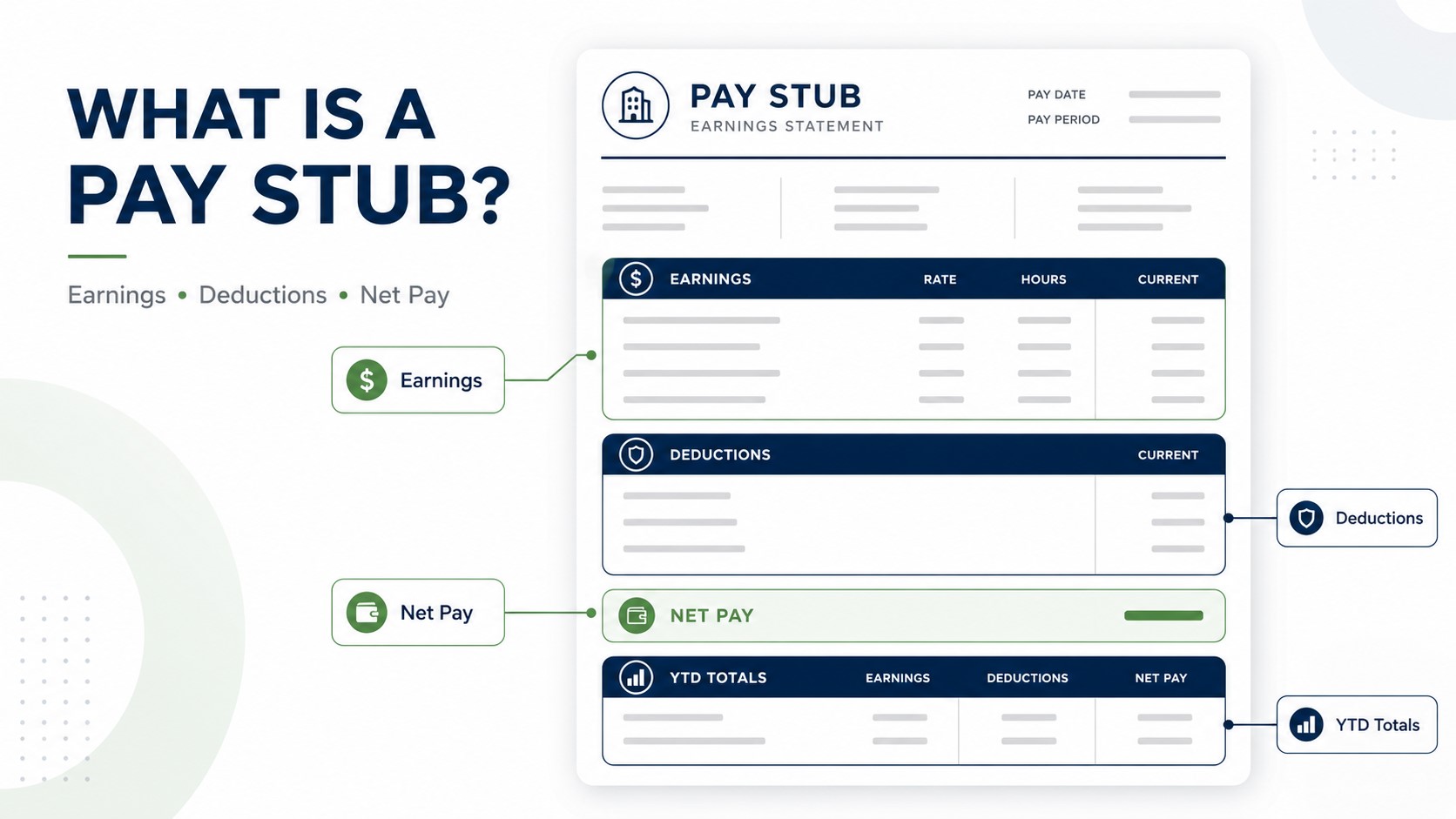
A pay stub is a paper or digital wage statement for one pay period that shows what an employee earned, what was withheld or deducted, and the net pay that remained. It commonly includes the pay period, pay date, gross pay, taxes, other deductions, net pay and year-to-date (YTD) totals.
A paycheck or direct deposit is the payment. The pay stub is the record that explains how the payment was calculated.
A pay stub may also be called a paycheck stub, check stub, earnings statement, wage statement, pay statement or payslip. In payroll, the phrase payment stub can also refer to a pay stub, although outside payroll it can mean a different kind of payment or remittance record.
If you already have a statement in front of you and want to decode every line, use the separate step-by-step guide to reading a pay stub. This page stays focused on the definition: what a pay stub is, what information it contains, what it looks like, why it is used and what it can reasonably tell you.
What Does a Pay Stub Mean?
A pay stub is the itemized payroll statement connected to a specific wage payment. It creates a record of the pay period and shows the path from earnings to take-home pay. In practical terms, it answers three questions: What did I earn? What came out? What was I paid?
The document can be printed and attached to a paper paycheck, or it can be delivered electronically through a payroll portal, app or downloadable PDF when wages are paid by direct deposit. The format can change without changing the basic purpose.
Pay stub = the payroll explanation. Paycheck or direct deposit = the wage payment.
What Information Is on a Pay Stub?
There is no single universal layout, but most U.S. pay stubs organize the same core categories: who was paid, which period the payment covers, what was earned, what was withheld or deducted and what amount remained as net pay.
| Section | What you may see | What it tells you |
|---|---|---|
| Employer and employee | Names, employer details, employee identifier | Who issued the record and who was paid |
| Pay period and pay date | Period start/end and payment date | Which work period the payment covers and when it was issued |
| Earnings | Regular wages, salary, overtime, bonus, commission or PTO | How current gross earnings were built |
| Gross pay | Total current earnings before employee taxes and deductions | The starting amount for the current payroll calculation |
| Taxes | Federal income tax, Social Security, Medicare and applicable state/local withholding | Tax amounts withheld from the payment |
| Other deductions | Health benefits, retirement, garnishments or other deductions | Other amounts that reduced or affected current take-home pay |
| Net pay | Current take-home amount | The amount payroll calculated to be paid to the employee |
| YTD totals | Running totals for applicable earnings, taxes and deductions | What has accumulated so far in the year |
Some stubs also show hours, rates, taxable wage bases, employer-paid benefits, PTO balances, reimbursements or masked direct-deposit details. Those fields vary by employer and payroll system. For a deeper field-by-field explanation, use What Is on a Pay Stub? Every Field Explained. For codes such as REG, OT, FIT, OASDI, MED, EE, ER and YTD, see the pay stub abbreviations guide.
What Does a Pay Stub Look Like? Labeled Example
A pay stub can be a paper statement, payroll PDF or employee-portal screen. The following fictional example shows the common structure without representing a real employer, employee or payroll transaction.
For a larger visual walkthrough, see what a pay stub looks like or compare different pay stub sample templates.
How Does a Pay Stub Work?
The basic job of the statement is to reconcile current earnings with the amount paid. At a simple structural level:
Current gross earnings − current employee taxes − current employee deductions + applicable additions = current net pay.
Using the fictional example:
- Gross pay: $2,000.00
- Federal tax: −$210.00
- Social Security: −$124.00
- Medicare: −$29.00
- State tax: −$67.00
- Health deduction: −$50.00
- Net pay: $1,520.00
The numbers above are illustrative, not a tax estimate. Actual withholding depends on the worker, location, elections and payroll setup. Also, a real pay stub can contain different taxable wage bases, so a tax line is not always calculated from the headline gross-pay amount. For the broader relationship between the two headline figures, see gross pay vs. net pay.
What Are Pay Stubs Used For?
A pay stub is useful because it connects a wage payment to the payroll calculation behind it.
| Use | What the pay stub helps show |
|---|---|
| Checking a paycheck | Hours, rate, earnings, taxes, deductions and net pay |
| Finding payroll differences | Which line changed compared with hours, pay rate, benefits or a prior statement |
| Income documentation | Recent employer, pay frequency, gross earnings and YTD totals where shown |
| Comparing pay periods | Changes in earnings, withholding or deductions |
| Year-end review | Running wage and withholding totals to compare with year-end tax documents |
| Supporting a wage question | A contemporaneous record of what payroll reported for the pay period |
A pay stub is commonly used as one form of proof of income, but the receiving landlord, lender, agency or other reviewer decides what evidence it accepts and whether additional documents are required. For that separate intent, see what counts as proof of income.
Is It “Pay Stub” or “Paystub”? One Word or Two?
“Pay stub” is the standard two-word form. Merriam-Webster lists paystub as a less-common variant, and gives the plurals pay stubs and paystubs. Both forms are understood, but pay stub is the clearest default for formal U.S. payroll writing.
| Form | Practical guidance |
|---|---|
| Pay stub / pay stubs | Standard form and best default in formal writing |
| Paystub / paystubs | Recognized less-common variant; common in software names and search queries |
Simple rule: If you are deciding whether “pay stub” is one word or two, use pay stub. The one-word spelling paystub is a recognized variant, not a different document.
Pay Stub, Paycheck Stub, Check Stub, Payment Stub, or Payslip?
Payroll terminology is not perfectly standardized. Two employers can issue essentially the same document and use different labels.
| Term | Usually means | Important nuance |
|---|---|---|
| Pay stub / paystub | An itemized payroll statement | Common U.S. wording; spelling varies |
| Paycheck stub / check stub | Usually the same payroll record | Emphasizes its connection to a paycheck |
| Earnings statement / pay statement | An itemized payroll statement | Common employer or payroll-system wording |
| Wage statement | A payroll record showing wage details | Often appears in regulatory or employment-law contexts |
| Payslip | The same general type of payroll document | More common outside the United States |
| Payment stub | Can mean a pay stub in payroll | Outside payroll, it may instead refer to a remittance or other payment record |
For a terminology-focused comparison, see pay stub vs. payslip vs. earnings statement.
What Makes a Pay Stub Useful?
There is no single nationwide visual format that every payroll statement must follow. For practical review, a useful wage statement should let you connect a real payment to the people, dates and payroll figures behind it.
- Who issued it: employer or payer information.
- Who was paid: employee identity or another appropriate identifier.
- When: pay period and pay date.
- What was earned: earnings, hours/rates where applicable and gross pay.
- What came out: taxes and other employee deductions.
- What remained: net pay.
- What has accumulated: applicable YTD figures when the statement includes them.
A template or generator formats payroll information; it does not independently verify employment or make inaccurate information valid. Any pay stub should be based on genuine, accurate underlying payroll information.
What Can a Pay Stub Prove — and What Can It Not Prove?
A pay stub can be useful evidence of recent wage information, but it should not be treated as proof of every fact about someone's employment or finances.
| A pay stub can help show | It does not automatically prove |
|---|---|
| Recent wage income reported for a pay period | That employment will continue |
| The employer or payer shown on the record | Future earnings |
| Pay frequency and pay period | That every landlord, lender or agency will accept it by itself |
| Gross pay, deductions and stated net pay | That the funds successfully reached a bank account |
| YTD earnings, when shown | That user-entered information on a generated document was independently verified |
If you need to prove that the wage payment actually arrived, compare the statement with the paper check, bank transaction, payroll-card activity or other payment record. The pay stub vs. paycheck guide explains that distinction in more detail.
Pay Stub vs. Paycheck, W-2, and Payslip
| Document | What it is | Main purpose |
|---|---|---|
| Pay stub | An itemized payroll statement for a pay period | Explain earnings, taxes, deductions and net pay |
| Paycheck / direct deposit | The wage payment itself | Deliver money to the employee |
| W-2 | An annual federal wage and tax statement | Report annual wage and tax information for tax purposes |
| Payslip | Usually another name for the same general payroll statement | Explain pay-period earnings and deductions |
A pay stub and a W-2 can contain related numbers without being interchangeable. If you are comparing year-end figures, see pay stub vs. W-2.
How to Check a Pay Stub in 30 Seconds
You do not need to decode every abbreviation before deciding whether the statement broadly makes sense. Start with five checks:
- Dates: Confirm the pay period and pay date.
- Gross: Check that current earnings broadly match your hours, salary and other pay.
- Deductions: Review taxes, benefits and other amounts you do not recognize.
- Net: Compare current net pay with the total check or direct-deposit amount.
- YTD: Do not confuse cumulative year-to-date figures with current-period amounts.
If current and cumulative columns are causing confusion, read Current vs. YTD on a Pay Stub. For a deeper audit, use the dedicated pay stub reading guide.
What If Something on the Pay Stub Looks Wrong?
Identify the exact line that appears wrong before assuming the entire payroll calculation is incorrect.
- Confirm the pay period and pay date.
- Compare hours, salary, pay rate, overtime or other earnings with your underlying work records.
- Separate current amounts from YTD totals.
- Compare benefit deductions with your enrollment information.
- Check whether an unfamiliar amount is employee-paid or employer-paid.
- Save the original statement and ask payroll or HR to explain the specific discrepancy.
If the problem is specifically a lower-than-expected payment, the guide Why Is My Paycheck So Low? shows which lines to compare first.
Do You Still Get a Pay Stub With Direct Deposit?
Often, yes. Direct deposit changes how the money is delivered; it does not change the function of the payroll statement. Many employers make pay stubs available through an employee portal, payroll app or downloadable PDF rather than attaching them to a paper check.
For details about account information and masked bank references, see what a pay stub shows about direct deposit. If you cannot find your statement, see how to get pay stubs from an employer or payroll portal.
Do Employers Have to Provide Pay Stubs?
Federal recordkeeping rules and employee pay-statement rules are different. The Fair Labor Standards Act requires covered employers to keep accurate records of hours worked and wages paid, but the U.S. Department of Labor states that the FLSA itself does not require employers to provide employees with pay stubs.
State law may create separate wage-statement requirements, including rules about what information must be shown and how statements may be delivered. Employers should check the rules that apply where the employee works instead of assuming one nationwide pay-stub format applies everywhere.
Important distinction: “An employer must keep payroll records” does not automatically mean “federal law requires the employer to give every employee a pay stub.” State or other employment rules may add separate obligations.
For federal background, see the U.S. Department of Labor FLSA Advisor on pay stubs and Fact Sheet #21 on recordkeeping.
How Long Should You Keep Pay Stubs?
Personal recordkeeping and employer recordkeeping are different questions.
| Who | General guidance | Why |
|---|---|---|
| Employee | Consumer.gov recommends keeping pay stubs for a year and comparing them with the W-2 before discarding them. | Helps reconcile annual wages and withholding and resolve pay questions. |
| Employer — FLSA payroll records | DOL says covered employers generally preserve payroll records for at least three years. | Federal wage-and-hour recordkeeping. |
| Employer — wage-calculation records | DOL says certain records used to compute wages should generally be retained for two years. | Supports calculations such as hours and wage rates. |
| Employer — employment-tax records | IRS guidance says to keep employment-tax records for at least four years. | Federal employment-tax administration. |
Those employer rules cover broader payroll and tax records, not simply an employee's personal copy of one statement. State rules, contracts, litigation holds or other requirements may call for longer retention.
Frequently Asked Questions About Pay Stubs
A paycheck stub is another name for a pay stub. It is the itemized payroll statement that explains the earnings, taxes, deductions and net pay connected to a wage payment.
In payroll, “payment stub” may refer to a pay stub or paycheck stub. In other financial contexts, it can mean a remittance or payment record unrelated to employee wages, so the surrounding context matters.
Pay stub is the standard two-word form. Merriam-Webster lists paystub as a less-common variant, so both forms are understood.
YTD means year-to-date. It is the running total for the payroll line beside it through the current pay date. A statement can show separate YTD totals for earnings, taxes and deductions. See the detailed YTD pay stub guide for examples.
Often, yes. A recent employer-issued pay stub can help document wage income because it may show the employer, pay period, gross pay, pay frequency and YTD earnings. The receiving organization decides whether one pay stub is sufficient or whether other documents are required.
No. The paycheck or direct deposit is the wage payment. The pay stub is the payroll statement explaining how that payment was calculated.
No. A pay stub covers an individual pay period, while a W-2 is an annual wage and tax statement. Their totals can differ because the documents report different payroll and tax concepts.
Need to Create a Pay Stub From Accurate Payroll Information?
Employers and other legitimate users can organize real earnings, taxes, deductions, pay dates and YTD information into a professional wage statement. Verify every entry against the underlying payroll information before using or sharing the document.
Create a Pay StubSources Used for This Guide
- Merriam-Webster — Pay Stub Definition and Variant Spelling
- Consumer.gov — Your Paycheck Explained
- U.S. Department of Labor — Are Pay Stubs Required?
- U.S. Department of Labor — FLSA Recordkeeping Requirements
- IRS — Employment Tax Recordkeeping
Source review date: September 29, 2026.