
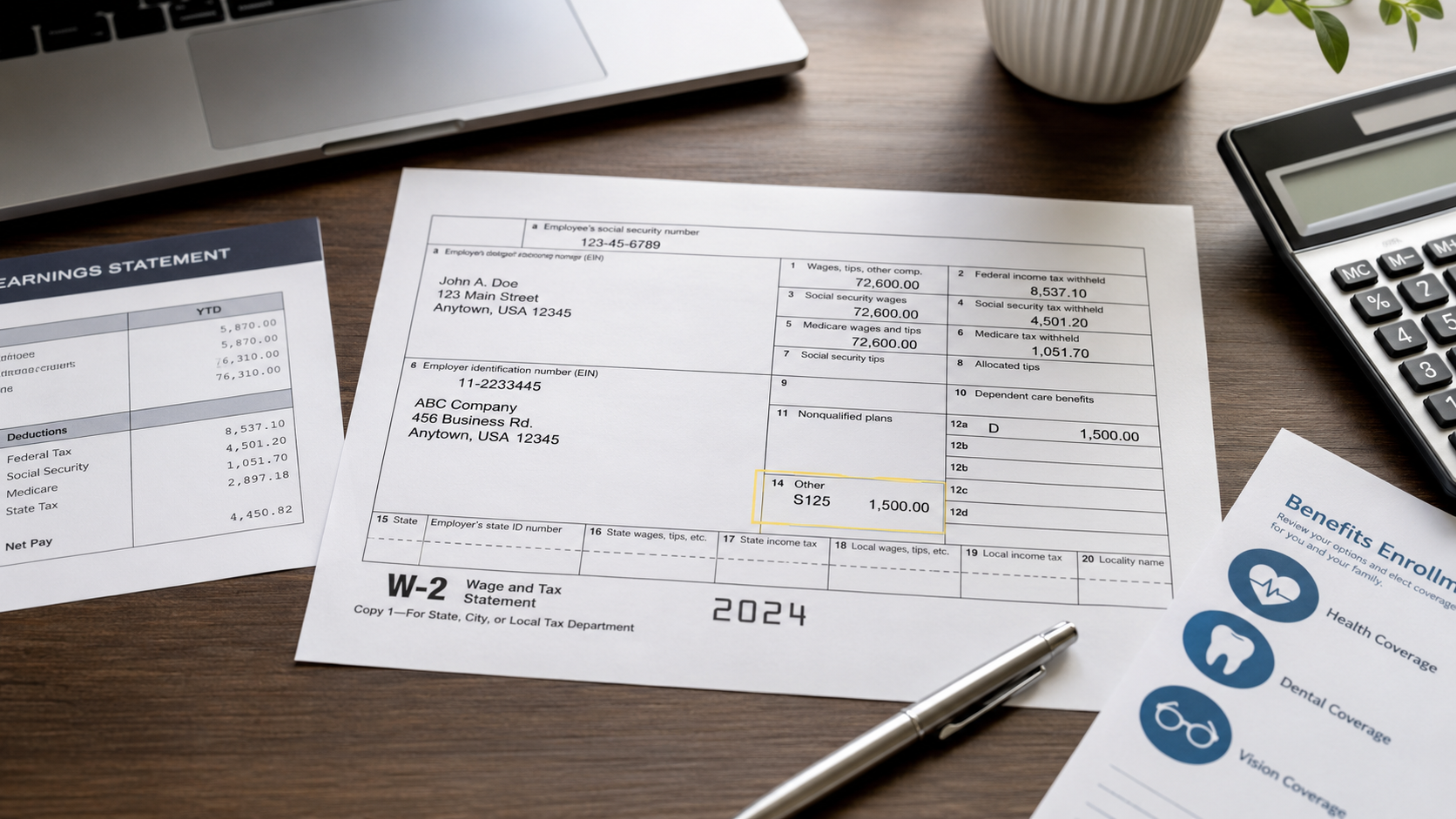
What Is S125 in Box 14 or 14a on a W-2? Section 125 Pre-Tax Benefits Explained
S125 usually means Section 125 cafeteria-plan benefits paid through payroll on a pre-tax basis. If it appears in Box 14 on an older W-2 or Box 14a on a 2026 W-2, it is generally an employer-created label for informational reporting, not an official IRS Box 14 code and not a new tax. The IRS 2026 W-2 instructions describe Box 14a as “Other” information that employers label themselves. In many common cases, the related pre-tax deductions have already been reflected in your W-2 wages, so you should not subtract the S125 amount from Box 1 a second time.
Box 12 has standardized IRS codes such as Code W for HSA contributions and Code DD for the cost of employer-sponsored health coverage. Box 14/14a is different: employers can use their own labels for “Other” information. That is why one W-2 may say S125 while another says SEC 125, CAF125, CAFE 125, or a benefit-specific description.
If your goal is simply to finish your tax return, enter the W-2 as issued and follow your tax software's instructions for Box 14 or 14a. If the amount looks wrong, use the checks below before changing any wage figure.
What Does S125 Mean on a W-2?
S125 is payroll shorthand commonly used for benefits provided through a Section 125 cafeteria plan. Under federal rules, a cafeteria plan is a written plan that can let employees choose between taxable compensation and certain qualified benefits. The IRS explains cafeteria-plan and fringe-benefit treatment in Publication 15-B. Common qualified benefits can include accident and health benefits, dependent care assistance, certain group-term life insurance coverage, and Health Savings Account contributions.
The label itself does not tell you every benefit included in the dollar amount. Employers and payroll systems can group or separate benefits differently, so the safest interpretation is: S125 identifies Section 125-related payroll information, but your employer can confirm exactly what its S125 total contains.
| Label you may see | Likely meaning | What to verify |
|---|---|---|
| S125 / SEC 125 | Section 125 cafeteria-plan information | Which benefits are included in the amount |
| CAF125 / CAFE 125 | Cafeteria-plan shorthand | Whether it represents premiums, FSA deductions, or another benefit |
| POP | Premium-only plan shorthand | Which insurance premiums were taken pre-tax |
| Benefit-specific wording | Employer-defined informational label | Whether the item is already reflected in taxable wages |
Box 14 vs Box 14a: Which One Should Show S125?
The answer depends on the tax year printed on the W-2. According to the IRS 2026 General Instructions for Forms W-2 and W-3, the old Box 14 was split into Box 14a and Box 14b. Information previously reported in Box 14 “Other” is now reported in Box 14a “Other”, while Box 14b is used for Treasury Tipped Occupation Codes.
| W-2 tax year | Where “Other” information appears | What that means for S125 |
|---|---|---|
| 2025 and earlier forms | Box 14 | An employer may show S125 or a similar label in Box 14. |
| 2026 Form W-2 | Box 14a | Optional “Other” information moves to Box 14a, so an employer using S125 would generally place it there. |
| 2026 Box 14b | Treasury Tipped Occupation Code(s) | S125 is not the purpose of Box 14b. |
During calendar year 2026, many people are still filing returns using a 2025 W-2, which uses the older Box 14 layout. A 2026 W-2 reports wages paid during 2026 and is generally furnished after that tax year ends. Check the tax year on the form before deciding whether “Box 14” or “Box 14a” applies.
Is S125 an Official IRS W-2 Code?
No. S125 is not one of the IRS's standardized Box 12 letter codes. The IRS instructions for Box 14a allow employers to use the box for other information and require each item to be labeled. The IRS lists examples such as state disability insurance taxes withheld, union dues, uniform payments, health insurance premiums deducted, nontaxable income, educational assistance payments, and certain pension-plan contributions. “S125” is therefore an employer/payroll label, not a universal IRS code with one mandatory definition.
This matters because the wording is not universal. “S125” is useful shorthand, but the label alone does not prove that every dollar was treated the same way for federal, Social Security, Medicare, state, or local tax purposes.
Is S125 Taxable, or Has It Already Been Deducted?
For many common Section 125 elections, the tax benefit happens through payroll before the W-2 is created. That means the deduction may already have reduced the wage amount reported in Box 1. Depending on the specific benefit and applicable tax rule, it may also affect Social Security wages in Box 3 and Medicare wages in Box 5.
A simple isolated example
Assume an employee has $60,000 of gross pay and $3,000 of qualifying pre-tax health premiums through a Section 125 arrangement, with no other adjustments affecting Box 1. In that simplified situation:
The $3,000 is not extra income. It helps explain why taxable wages can be lower than gross pay. Real W-2s may also include retirement deferrals, taxable fringe benefits, bonuses, reimbursements, or other adjustments, so gross pay minus S125 is not a universal Box 1 formula.
For a broader reconciliation method, see how to calculate W-2 wages from a pay stub.
How S125 Can Relate to Box 1, Box 3, and Box 5
The three wage boxes measure different tax bases, so comparing them can help you understand what happened in payroll. Use the pattern as a diagnostic clue, not as proof of the exact benefit.
| W-2 box | What it represents | What an S125-related benefit may do |
|---|---|---|
| Box 1 | Federal taxable wages | Many qualifying pre-tax benefits can reduce Box 1 wages. |
| Box 3 | Social Security wages | Some qualifying Section 125 benefits can reduce Social Security wages; other payroll items can create different patterns. |
| Box 5 | Medicare wages and tips | Some qualifying Section 125 benefits can reduce Medicare wages; verify the specific benefit rather than assuming. |
| Box 14 / 14a | Employer-labeled “Other” information | May show an S125 total for information or state/local reporting context. |
A traditional pre-tax 401(k) deferral commonly reduces federal income-tax wages while still being included in Social Security and Medicare wages. Section 125 health-related deductions can follow a different pattern. That is one reason a full W-2 reconciliation should consider Box 12 retirement codes and your final pay stub, not S125 alone.
For more context, see pre-tax vs post-tax deductions and FICA on a pay stub.
Why the S125 Amount May Not Match Your Final Pay Stub
A mismatch is worth checking, but it does not automatically mean the W-2 is wrong. Box 14/14a reporting is employer-defined, so your year-end S125 number may be grouped differently from the deduction labels on individual pay stubs.
- The employer may combine several benefits under one S125 label.
- The employer may report only selected Section 125 items in Box 14/14a.
- A benefit code may have changed after open enrollment or a mid-year plan change.
- Refunds, corrections, retroactive deductions, or payroll adjustments can change year-to-date totals.
- HSA contributions made through a cafeteria plan have separate W-2 reporting in Box 12 with Code W. For the pay-stub side of the comparison, see HSA EE vs ER on a pay stub.
- Dependent care benefits have separate Box 10 reporting rules, so they should not automatically be expected to equal an S125 total.
Compare year-to-date amounts on your final pay stub, not just the last pay-period deduction. If you need help reading those columns, use the guide to YTD on a pay stub.
S125 vs Code W, Code DD, Box 10, and 401(k) Contributions
These items can all appear on the same W-2, but they answer different questions. Keeping them separate prevents double counting.
| Item | Where shown | What it tells you | Key distinction |
|---|---|---|---|
| S125 / SEC 125 / CAF125 | Box 14 or 14a, if employer chooses to report it | Employer-defined Section 125-related information | Not a standardized IRS Box 14 code |
| Code W | Box 12 | HSA contributions reportable under Code W, including employee contributions made through a Section 125 cafeteria plan | Standardized IRS code; the IRS specifically requires this reporting |
| Code DD | Box 12 | Cost of employer-sponsored health coverage | Informational coverage-cost figure; it does not by itself make the amount taxable |
| Dependent care benefits | Box 10 | Dependent care assistance subject to Box 10 reporting rules | Do not assume it is part of the employer's S125 total |
| 401(k) deferral | Box 12, typically Code D for a traditional 401(k) deferral | Retirement-plan salary deferral | Separate from an S125 label and can affect wage boxes differently |
What Should You Enter for S125 in Tax Software?
There is no single universal tax-software category that can be guaranteed correct for every employer, state, and S125 label. Box 14/14a is employer-labeled “Other” information, unlike standardized Box 12 codes. Start with the exact label and amount printed on the W-2, then let the software's current instructions determine whether a category is needed.
| What you see in the software | What to do | What not to do |
|---|---|---|
| A specific S125, Section 125, Cafe 125, or cafeteria-plan category | Use the software's help text to confirm that the category matches the W-2 label and your state before selecting it. | Do not assume similarly named categories have the same state treatment. |
| No exact S125 category, but an “Other” or “Not classified” option is available | Follow the product's instructions for Box 14/14a employer-defined entries. Some entries are informational and do not require a special federal category. | Do not force S125 into an unrelated tax, retirement, or HSA category. |
| The software changes your state return after you classify S125 | Pause and verify the state rule using the state's current instructions or payroll documentation. | Do not copy another state's treatment. |
| The amount already reduced Box 1 wages | Enter the W-2 as issued and follow the software workflow. | Do not subtract the S125 amount from Box 1 again. |
| You cannot tell what the employer included in S125 | Ask payroll for the benefit-by-benefit breakdown before changing a tax-software classification. | Do not guess from the label alone. |
For many employees, S125 is informational because the payroll tax treatment has already occurred. The safest starting point is the W-2 as issued, not a second manual deduction.
Does S125 Affect State Taxes?
It can. Federal and state treatment are not always identical, and the label “S125” by itself does not establish how a state wants every underlying benefit handled. State treatment can depend on both the type of Section 125 benefit and the state's own compensation rules.
The Pennsylvania Department of Revenue says certain contributions under a federally qualified Section 125 cafeteria plan, such as qualifying health or accident coverage, can be excluded from Pennsylvania taxable compensation to the extent the state rules allow. But Pennsylvania does not treat every cafeteria-plan benefit the same way; its guidance specifically notes that some other benefits, including dependent-care amounts, can receive different state treatment.
Practical rule: do not apply Pennsylvania's treatment, or any other state's treatment, to a different state. If tax software asks for a state-specific classification, use the current instructions for the state shown on the W-2, the software's current help documentation, or the employer's payroll explanation.
How to Check S125 Against Your Pay Stub
- Confirm the tax year on the W-2 so you know whether you are looking at old Box 14 or 2026 Box 14a.
- Open the final pay stub for the same calendar year.
- List year-to-date pre-tax health, dental, vision, FSA, HSA, and dependent-care deductions.
- Do not assume all of those items belong in one S125 total; identify items separately reported in Box 10 or Box 12.
- Compare gross pay with Box 1 and note other adjustments such as traditional retirement deferrals or taxable fringe benefits.
- Compare Boxes 3 and 5 when you are trying to understand FICA wage differences.
- If the employer's S125 total still cannot be reconciled, ask payroll for the benefit-by-benefit breakdown used for the W-2.
When Should You Ask Payroll to Review S125?
Ask payroll when the entry appears inconsistent with your records or you cannot identify the benefit behind the label. A payroll review is especially useful when the amount is duplicated, dramatically different from year-to-date records, tied to a benefit you never elected, or associated with wage boxes that do not reconcile after other known adjustments.
Hi, I noticed an S125 amount in Box 14/14a on my W-2. Can you confirm which benefits are included in this amount, whether those benefits were already reflected in Box 1 wages, whether any of them affected Boxes 3 or 5, and whether the S125 total should reconcile to specific year-to-date deductions on my final pay stub? Thank you.
If payroll confirms that a reportable W-2 amount is incorrect, ask what correction process applies. Do not change the official wage figures on your own.
Frequently Asked Questions
What does S125 mean on a W-2?
S125 usually means Section 125 cafeteria-plan information connected with pre-tax employee benefits. The exact benefits included depend on the employer's payroll setup.
Is S125 an official IRS code?
No. Unlike Box 12 codes, S125 is not a standardized IRS Box 14 code. Employers label Box 14/14a “Other” information themselves.
Is S125 already deducted from Box 1 wages?
Often, qualifying Section 125 deductions have already been reflected in taxable wages before the W-2 is created. Verify the specific benefit and payroll record rather than subtracting the Box 14/14a amount again.
Why does my W-2 say Cafe 125 or SEC 125 instead of S125?
Box 14/14a labels are employer-defined. Cafe 125, CAF125, SEC 125, and S125 can all be shorthand for Section 125-related information, but payroll can confirm what the amount contains.
Why is S125 in Box 14 on one W-2 and Box 14a on another?
The 2026 Form W-2 moved “Other” information from Box 14 to Box 14a. Older tax-year forms still use Box 14.
Is S125 the same as HSA Code W?
No. Code W is a standardized Box 12 code for HSA contributions reportable under that code, including employee contributions made through a Section 125 cafeteria plan. An S125 label in Box 14/14a is employer-defined informational reporting.
Is S125 the same as Code DD?
No. Code DD reports the cost of employer-sponsored health coverage in Box 12. It is a different informational item from an employer's S125 label.
Do I claim S125 as a separate deduction on my federal return?
Usually you should not create a second deduction simply because S125 appears on the W-2. Enter the W-2 as issued and follow the filing software or professional guidance that applies to your facts.
Can S125 be treated differently for state taxes?
Yes. State rules can differ from federal treatment and can vary by the type of Section 125 benefit. Use the state instructions that apply to your W-2 rather than assuming another state's treatment is the same.
Related Reading
Need Clear Payroll or W-2 Records?
ePaystubs can help you create organized payroll and W-2 records using accurate information from your real payroll data.
Create a W-2 FormSources and references